Afficher les sous-catégories sur la page catégorie
Article d’archive : PrestaShop 1.6 et 1.7 ne sont plus mis à jour, l’interface et le code peuvent différer sur les versions récentes.
Vous l'avez peut-être constaté mais sur la version Prestashop 1.7, les sous-catégories ne s'affichent pas sur les pages catégories comme sur Prestashop 1.6.
Voici un petit tutoriel, qui vous permettra de les faire apparaître rapidement.
Comment insérer les sous-catégories sur la page catégorie ?
Etape 1: Ouvrir le fichier category.tpl qui se situe dans ../themes/nomdevotretheme/templates/catalog/listing/category.tpl
Nom de votre thème = dans l'exemple suivant je prend le thème par defaut de Prestashop 1.7 qui se nomme "Classic"
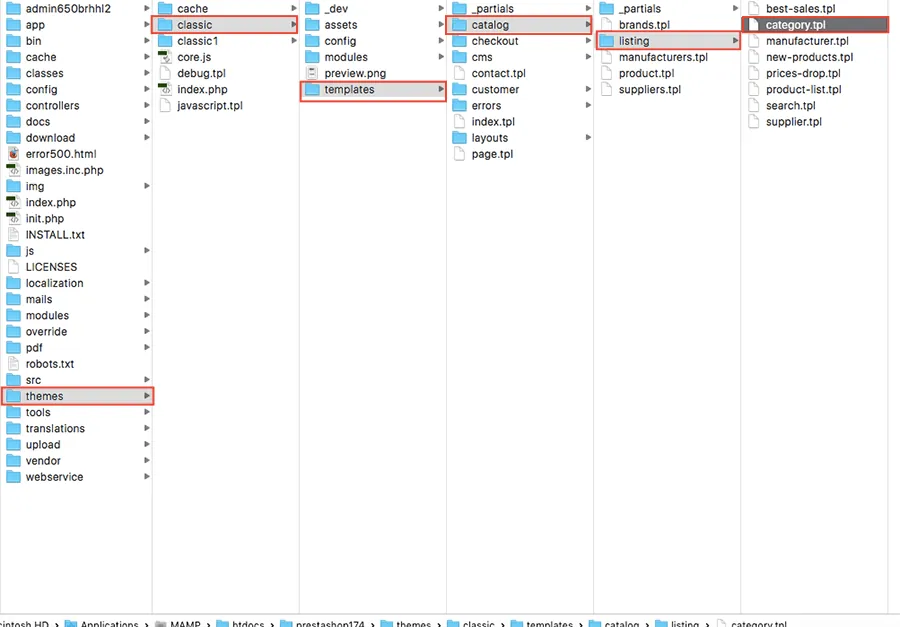
Etape 2 : juste avant la dernière balise </block>, insérez le code suivant :
	<div id="subcategories">
		<ul class="clearfix">
    	 {foreach from=$subcategories item=subcategory}
   			 <li>
      		  <a href="{$link->getCategoryLink($subcategory.id_category, $subcategory.link_rewrite)|escape:'html':'UTF-8'}" title="{$subcategory.name|escape:'html':'UTF-8'}" class="img">
         	  <img class="replace-2x" src="{$urls.base_url}img/c/{$subcategory.id_category}.jpg" alt="{$subcategory.name|escape:'html':'UTF-8'}"  />
       		  </a>
        	 <h5><a class="subcategory-name" href="{$link->getCategoryLink($subcategory.id_category, $subcategory.link_rewrite)|escape:'html':'UTF-8'}">{$subcategory.name|truncate:25:'...'|escape:'html':'UTF-8'}</a></h5>
   			</li>
   		{/foreach}
   		</ul>
    </div>
Ce qui doit donner
{**
 * 2007-2016 PrestaShop
 *
 * NOTICE OF LICENSE
 *
 * This source file is subject to the Open Software License (OSL 3.0)
 * that is bundled with this package in the file LICENSE.txt.
 * It is also available through the world-wide-web at this URL:
 * http://opensource.org/licenses/osl-3.0.php
 * If you did not receive a copy of the license and are unable to
 * obtain it through the world-wide-web, please send an email
 * to license@prestashop.com so we can send you a copy immediately.
 *
 * DISCLAIMER
 *
 * Do not edit or add to this file if you wish to upgrade PrestaShop to newer
 * versions in the future. If you wish to customize PrestaShop for your
 * needs please refer to http://www.prestashop.com for more information.
 *
 * @author    PrestaShop SA <contact@prestashop.com>
 * @copyright 2007-2016 PrestaShop SA
 * @license   http://opensource.org/licenses/osl-3.0.php Open Software License (OSL 3.0)
 * International Registered Trademark & Property of PrestaShop SA
 *}
{extends file='catalog/listing/product-list.tpl'}

{block name='product_list_header'}
    <div class="block-category card card-block hidden-sm-down">
        <h1 class="h1">{$category.name}</h1>
        {if $category.description}
            <div id="category-description" class="text-muted">{$category.description nofilter}</div>
            <div class="category-cover">
                <img src="{$category.image.large.url}" alt="{$category.image.legend}">
            </div>
        {/if}
    </div>
    <div class="text-xs-center hidden-md-up">
        <h1 class="h1">{$category.name}</h1>
    </div>
	<div id="subcategories">
		<ul class="clearfix">
    	 {foreach from=$subcategories item=subcategory}
   			 <li>
      		  <a href="{$link->getCategoryLink($subcategory.id_category, $subcategory.link_rewrite)|escape:'html':'UTF-8'}" title="{$subcategory.name|escape:'html':'UTF-8'}" class="img">
         	  <img class="replace-2x" src="{$urls.base_url}img/c/{$subcategory.id_category}.jpg" alt="{$subcategory.name|escape:'html':'UTF-8'}"  />
       		  </a>
        	 <h5><a class="subcategory-name" href="{$link->getCategoryLink($subcategory.id_category, $subcategory.link_rewrite)|escape:'html':'UTF-8'}">{$subcategory.name|truncate:25:'...'|escape:'html':'UTF-8'}</a></h5>
   			</li>
   		{/foreach}
   		</ul>
    </div>
 {/block}
Etape 3: Ouvrir le fichier theme.css qui se situe dans ../themes/nomdevotretheme/assets/css/theme.css
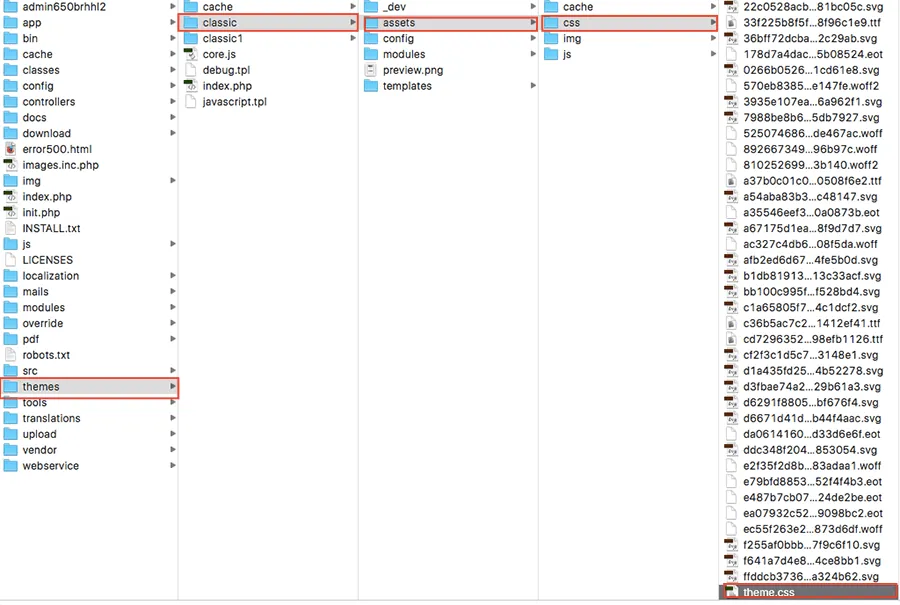
Etape 4 : ajoutez le code suivant :
#subcategories ul li {
  float: left;
  width: 25%;
  text-align: center;
}
#subcategories ul li img {
  margin-bottom: 10px;
}
Etape 5 : et voila :
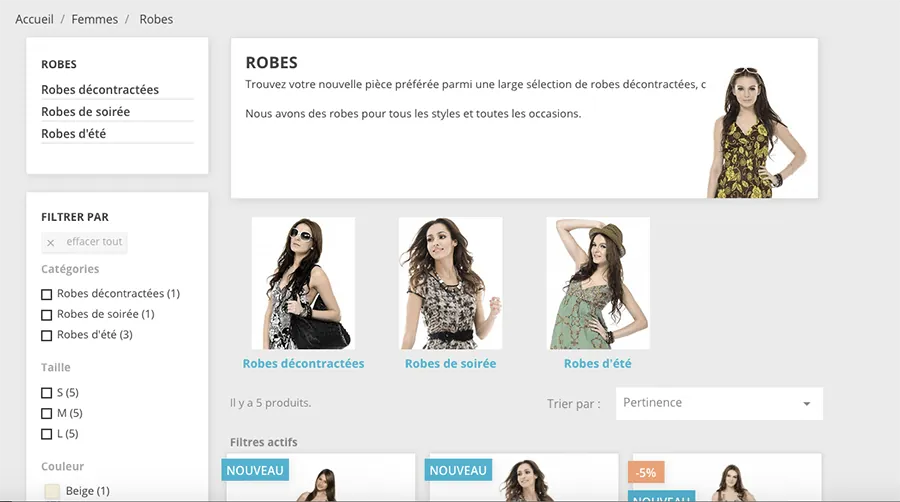
ATTENTION: si ne vous visualisez pas les modifications, c'est sûrement un problème de cache. Veuillez consulter l'article suivant : Comment vider dans Prestashop 1.6 et Prestashop 1.7